Where to Find Ignite Audiences in Google Ads
Before you can find your audiences, you must first export them. Learn how here: How to Sync Audiences from Ignite to Google Ads.
Once you have successfully exported an audience from Ignite to Google Ads, you can locate it in your Audience Manager to utilize in your campaigns.
Step-by-Step Instructions
-
Navigate to Google Ads (ads.google.com). If you manage multiple accounts, ensure you have selected the appropriate individual client account from the dropdown.
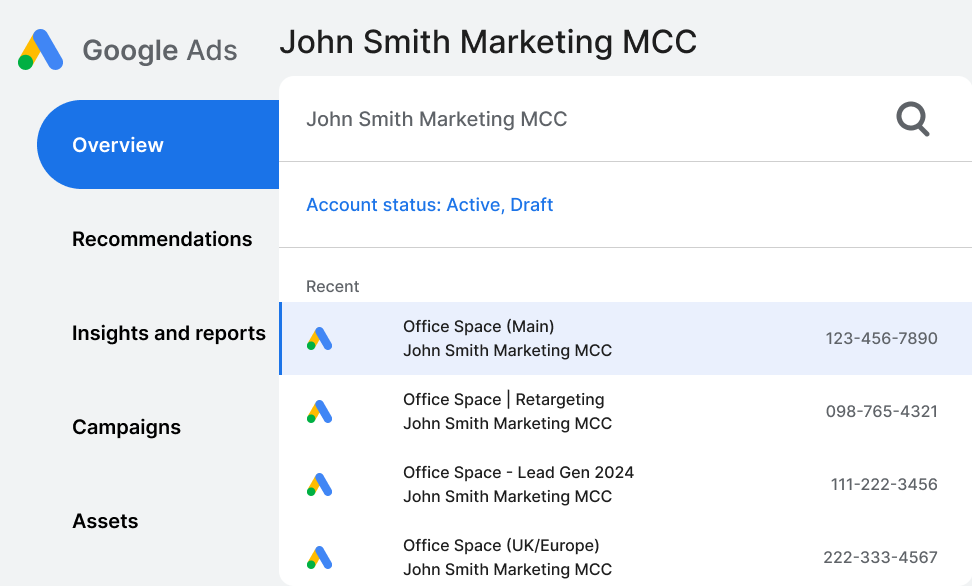
-
From the Overview page, use the left-hand navigation bar and select Tools > Shared Library > Audience manager.
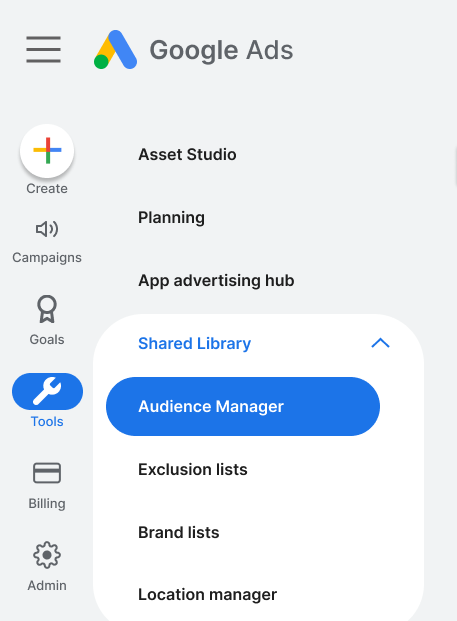

- Your synced Ignite audiences will appear under the Your data segments tab. All Ignite audiences will be categorized with the Customer List segment type.
⚠️ Important Google Ads Requirements for Customer Match Google refers to imported customer lists as "Customer Match." For your Google Ads account to be eligible to use these lists, it must meet Google's strict requirements:
- Account History: Brand new Google Ads accounts may not be eligible for Customer Match until they establish a history of good compliance and payment history with Google.
- Audience Size: Audiences must have at least 100 matched users in order to be actively used in campaigns.
- Data Freshness: To stay eligible, a list must have at least 100 members added or updated within the last 540 days. We highly recommend selecting the "Continuous Sync" option when exporting from Ignite to ensure your lists are always refreshed and compliant.